LLM Integration
Introduction
Syntera Marketplace's LLM Integration component is an enterprise-grade platform for deploying, managing, and accessing open-source large language models (LLMs) and AI agents. This documentation provides comprehensive guidance for efficiently utilizing our platform to integrate powerful AI capabilities into your applications through our API endpoints.
Table of Contents
- Platform Overview
- Available Models
- Getting Started
- Model Selection Guide
- Model Configuration
- API Reference
- Security & Compliance
- Rate Limits & Performance
- Troubleshooting
- Use Case Examples
- Best Practices
- FAQs
Platform Overview
Syntera Marketplace enables organizations to leverage state-of-the-art AI models through our API endpoints. Our platform distinguishes itself through:
Key Features
- 🤖 Multiple Model Support
- Access to various open-source and proprietary models
- Easy model switching through configuration
- Automatic resource scaling for complex requests
-
Cost-effective resource allocation
-
🔄 Resource Management
- Dynamic resource allocation based on request complexity
- Automatic scaling to dedicated machines for heavy workloads
- Cost optimization through resource sharing
-
Performance monitoring and optimization
-
🛠️ API Integration
- Simple REST API endpoints
- Consistent response format
- Webhook support for async operations
- Streaming response handling
Platform Architecture
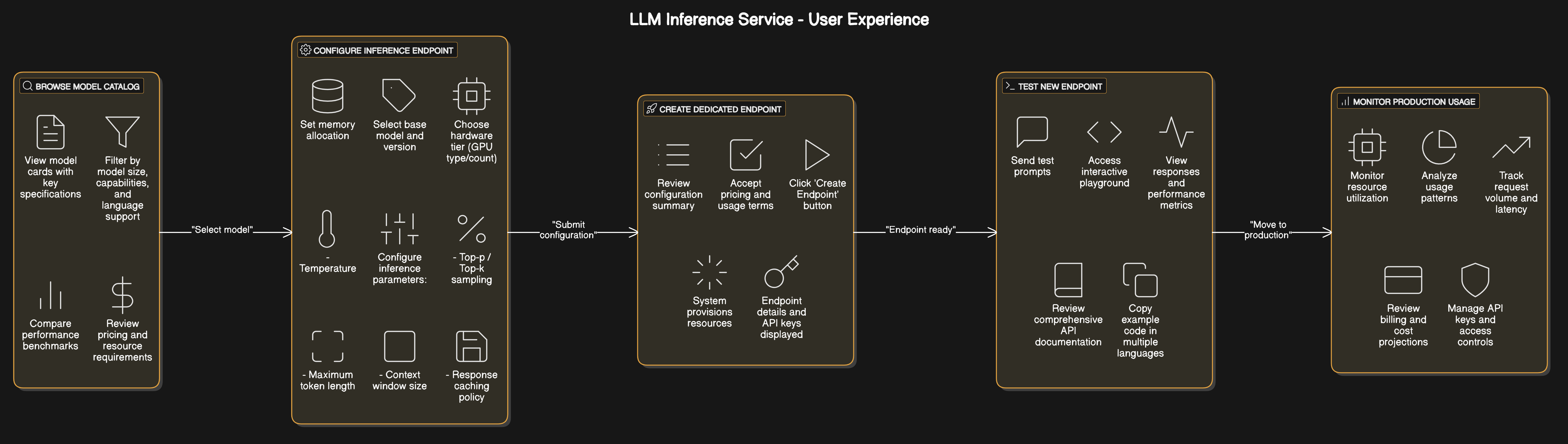
Available Models
Language Models (LLMs)
| Model Category | Description | Use Cases |
|---|---|---|
| Instruction-tuned LLMs | Models optimized for following specific instructions | Chatbots, virtual assistants, content generation |
| Base LLMs | Foundation models with broader capabilities | Research, fine-tuning projects, creative applications |
| Specialized LLMs | Domain-specific models (legal, financial, medical, etc.) | Industry-specific applications requiring domain expertise |
Multimodal Models
Models capable of processing both text and other data types:
- Text-to-Image: Generate images from textual descriptions
- Image Understanding: Extract information and insights from visual content
- Audio Processing: Transcription, translation, and audio generation capabilities
Getting Started
Prerequisites
- API key from Syntera Marketplace
- Basic understanding of REST APIs
- Infrastructure requirements based on your use case
Quick Start
- Get your API key:
- Register at mar-syntera.ai
- Navigate to API Keys section
-
Generate a new API key
-
Make your first request:
-
Python example:
import requests
import json

API_KEY = "your-api-key"
API_URL = "https://mar-syntera.ai/v1/completions"

headers = {
    "Authorization": f"Bearer {API_KEY}",
    "Content-Type": "application/json"
}

data = {
    "model": "your-selected-model",
    "prompt": "What is artificial intelligence?",
    "max_tokens": 256,
    "temperature": 0.7
}

response = requests.post(API_URL, headers=headers, json=data)
result = response.json()
print(result["choices"][0]["text"])
Model Configuration
Basic Parameters
| Parameter | Type | Description | Typical Range |
|---|---|---|---|
| max_tokens | Integer | Controls output length | 128-4096 |
| temperature | Float | Randomness/creativity level | 0.0-1.0 |
| top_p | Float | Nucleus sampling parameter | 0.0-1.0 |
| top_k | Integer | Limits token selection | 1-100 |
| repetition_penalty | Float | Reduces repetition | 1.0-2.0 |
Resource Management
Our platform automatically manages resources based on your request:
- Standard Requests: Processed on shared model instances
- Complex Requests: Automatically routed to dedicated instances
- Resource Scaling: Dynamic allocation based on:
- Request complexity
- Token count
- Concurrent requests
- Available resources
Cost Optimization
- Shared Resources: Lower cost for standard requests
- Dedicated Resources: Higher cost for complex requests
- Automatic Scaling: Pay only for what you use
- Resource Monitoring: Track usage and costs
API Reference
Authentication
All API requests require an API key for authentication:
curl -X POST "https://mar-syntera.ai/v1/completions" \
  -H "Authorization: Bearer YOUR_API_KEY" \
  -H "Content-Type: application/json" \
  -d '{
    "model": "your-selected-model",
    "prompt": "Once upon a time"
  }'
Endpoints
Text Completion
response = requests.post(
    "https://mar-syntera.ai/v1/completions",
    headers={
        "Authorization": f"Bearer {API_KEY}",
        "Content-Type": "application/json"
    },
    json={
        "model": "your-selected-model",
        "prompt": "Input text to complete",
        "max_tokens": 256,
        "temperature": 0.7,
        "top_p": 0.9,
        "stop": ["\n", "END"]
    }
)
Chat Completion
response = requests.post(
    "https://mar-syntera.ai/v1/chat/completions",
    headers={
        "Authorization": f"Bearer {API_KEY}",
        "Content-Type": "application/json"
    },
    json={
        "model": "your-selected-model",
        "messages": [
            {"role": "system", "content": "You are a helpful assistant."},
            {"role": "user", "content": "Hello, how are you?"}
        ],
        "max_tokens": 256,
        "temperature": 0.7
    }
)
Security & Compliance
Data Privacy
- Data Isolation: All processing occurs within our secure infrastructure
- No External Data Transfer: Models do not send data outside our environment
- No Training on User Data: Your inputs are not used to train or improve models
- Data Retention Controls: Configure retention policies for logs and requests
Authentication & Authorization
- API Key Management: Rotate, revoke, and manage access keys
- Role-Based Access Control: Define user roles and permissions
- IP Restrictions: Limit API access to specific IP ranges
- Usage Auditing: Track and monitor all API requests
Rate Limits & Performance
Default Rate Limits
| Tier | Requests/min | Requests/hour | Concurrent |
|---|---|---|---|
| Standard | 60 | 3,000 | 5 |
| Professional | 300 | 15,000 | 20 |
| Enterprise | Custom | Custom | Custom |
Performance Optimization
- Request Batching: Combine multiple requests for efficiency
- Streaming Responses: Get partial results as they're generated
- Resource Monitoring: Track resource usage and costs
- Automatic Scaling: Platform handles resource allocation
Troubleshooting
Common Issues
| Issue | Possible Causes | Resolution |
|---|---|---|
| Slow Response Times | Complex requests, high load | Consider request optimization |
| Rate Limit Errors | Exceeding request quotas | Implement rate limiting |
| Authentication Failures | Invalid API key | Verify key, regenerate if necessary |
| Resource Allocation | Complex request requiring dedicated resources | Monitor costs and optimize requests |
| Output Quality Issues | Suboptimal parameters | Refine parameters and prompt design |
Use Case Examples
Content Generation
response = requests.post(
    "https://mar-syntera.ai/v1/completions",
    headers={
        "Authorization": f"Bearer {API_KEY}",
        "Content-Type": "application/json"
    },
    json={
        "model": "content-generator-v1",
        "prompt": "Write a product description for a wireless ergonomic keyboard:",
        "max_tokens": 200,
        "temperature": 0.7
    }
)
Customer Support Chatbot
response = requests.post(
    "https://mar-syntera.ai/v1/chat/completions",
    headers={
        "Authorization": f"Bearer {API_KEY}",
        "Content-Type": "application/json"
    },
    json={
        "model": "support-assistant-v2",
        "messages": [
            {"role": "system", "content": "You are a helpful customer support assistant."},
            {"role": "user", "content": "I'm having trouble connecting my device to WiFi."}
        ],
        "max_tokens": 150,
        "temperature": 0.3
    }
)
Best Practices
Request Optimization
- Be Specific: Clear, detailed prompts produce better results
- Context Matters: Provide relevant background information
- Format Instructions: Specify desired output format
- Examples Help: Few-shot examples improve consistency
- System Messages: Use system messages to set behavior expectations
Resource Management
- Monitor Usage: Track resource consumption and costs
- Optimize Requests: Balance complexity and resource usage
- Batch When Possible: Combine similar requests
- Use Streaming: For long-running requests
FAQs
General Questions
Q: How does resource allocation work?
A: Our platform automatically manages resources. Standard requests use shared resources, while complex requests are automatically routed to dedicated instances with appropriate resource allocation.
Q: How are costs calculated?
A: Costs are based on resource usage. Standard requests on shared resources are more cost-effective, while complex requests requiring dedicated resources have higher costs.
Q: How do I optimize my requests?
A: Consider request complexity, use appropriate parameters, and monitor resource usage. Our platform provides tools to help optimize your requests.
Technical Questions
Q: What happens when a request is too complex?
A: The platform automatically routes complex requests to dedicated resources, ensuring reliable processing while maintaining performance for other users.
Q: How can I monitor resource usage?
A: Use our monitoring dashboard to track resource consumption, costs, and performance metrics for your requests.
Q: Can I control resource allocation?
A: While the platform automatically manages resources, you can optimize your requests to better control resource usage and costs.
Last updated: May 11, 2025